
guddu478
Active Member
FiiO K13 R2R - DAC & Headphone Amplifier with Pre-Amp, Digital Volume Control & PEQ

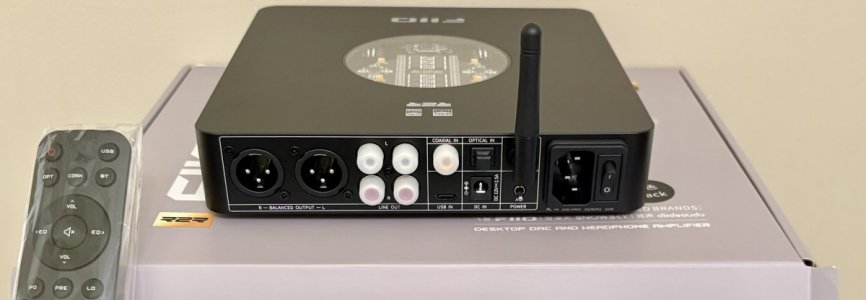

R2R DACs aren't new but never be as affordable.
While Objectivists won't stop "not liking" them because their measurements aren't top tier for their likings..... Subjectivists often find them more likable than others.
FiiO have been bringing such DACs into the market lately and here I am giving FiiO K13 R2R a serious try keeping objectivist inside me switched off.
As a hobbyist, my interest normally incline towards Audio Source, EQ, Amplifiers and speakers. It's simply because my experience with DACs (Delta Sigma specifically) so far have ended being same (or inaudible) really after living with so many. Their may have different features for different needs but overall sound quality found to be just transparent.
First I want to take basic details out of the way, so summarizing basic feature set:
- 24 bit R2R DAC and headphone amplifier
- It has fully differential design which, in theory, should have noise & distortion eliminated
- Inputs: Optical, Coaxial, Dual USB type C and Bluetooth 5.4
- Outputs: 2 set of RCA (single ended) and XLR (balanced)
- Decoding Modes: Over Sampling (OS) and Non Over Sampling (NOS) modes
- 10 Band Parametric EQ (PEQ) - accessible thorugh mobile app or web GUI on laptop through USB connection
- Built-in power supply (AC input), as well as external DC input option
- Remote Control (plasticky but responsive)
Please find more product details and specifications here:
https://www.fiio.com/k13r2r
*****
FiiO K3 R2R - Build Quality & Aesthetics
*****
K13 R2R is simply stunning in looks. FiiO have a way to adding a touch to the appearance K13 R2R.
Build is excellent, feels solid as oppose to similarly priced DACs which kind of looks plasticky.
Front display is large enough to read from 3-4 meter distance for me, with useful information in large display font. Top cover has round glass showing R2R module with different LED colors.
Combining all this, K13 R2R is a joy to look at every time....... quite different than looking at black box looking DACs.
*****
Time to clear up facts on operation modes - OS vs NOS
*****
Over Sampling (OS) Mode - Standard mode used by a DAC to construct a technically more accurate analog signal applying upsampling, digital filtering, shaping, etc.
Non Over Sampling (NOS) Mode - No additional processing applied after Digital to Analog conversation
*Note that OS/NOS modes are not specific to R2R DACs, Delta-Sigma DACs have same modes as well.
*Note that FiiO K13 R2R DAC has OS mode set by default, should be changed manually by Left Front Knob if desired.
While Objectively, OS mode is required to get more accurate noise/distortion/shaped/frequency-artifact-free signal achieving higher noise & distortion numbers, subjectivists prefer NOS mode often arguing that its pure unaltered output.
*****
Here is the setup I have in action
*****

TV --> optical_out --> Wiim Ultra --> optical_out --> Fiio K13 R2R --> RCA_out --> RCA_Switch --> 3e A7 Amplifier
TV --> optical_out --> Wiim Ultra --> RCA_out --> RCA_Switch --> 3e A7 Amplifier
Please note that the further details I am going to mention here are based on experience and opinion using K13 R2R in the mentioned setup.
*****
FiiO K13 R2R DAC - in action
*****
??? - Which mode should you use with K13 R2R
Technically speaking, Am I wrong to say NOS mode should sound kind of incorrect or something not-right?
Let me say the opposite, I did not find K13 R2R NOS mode incorrect, non-accurate or anything like that.
If anything, I found it really COHERENT and so easy to listen to.
??? - What about OS vs NOS on K13 R2R
I personally could not really detect any real differences if someone else was changing the mode re-playing the same song that we heard several times on this setup, and so many times in general.
Sure there may be differences, the best I could say probably minor.
*****
R13 R2R DAC - Sound Quality
*****
To begin with, I must say I really like it in my rig.
The best I can describe it is "absolutely COHERENT, engaging and easy to listen to".
I have several other DACs or streamers with DACs and it's not that I don't like them or something.
However, I am inclining to K13 R2R for what it brings on for me in my setup. This DAC doesn't push my attention to anything in specific within a song and gives me focus on the overall music or song. Its like somehow everything is neutral and balanced, nothing more or nothing less.
If I focus on specific part of a song or music for details, those are SURELY there. I did not find NOS mode loosing any details in a song or OS mode pushing anything additional as per say.
Both modes gave me very smooth and non-fatigue output.
??? Did I try blind test with SPL level matched - Sure I did
I am living with this setup from more than couple of weeks, and I do have RCA out from Wiim Ultra to same amplifier (3e A7, which I know is a transparent amplifier) as well.
I have done switching to Wiim output to RCA (blindly, by someone) and I could easily tell this one isn't R13 R2R because it changes the character as I mentioned above.
Likewise, OS & NOS blind switching was done several times.
??? But what about SINAD
Looking at the specs provided by FIIO, the SINAD score comes out around 78-79 dB SINAD.
My own experience says it is good enough for any use.
?? Does it produce any hiss, pop or other noise on power ON/OFF or on idle when nothing is playing
Absolutely nothing, I found it dead silent
Now that the basics are out of the way, time to explore PEQ feature.
*****
FiiO K13 R2R - Bluetooth Performance
*****
While I am a heavy audio streaming consumer, I also often use BT for background or casual music playback while I work or read.
K13 R2R has Bluetooth v5.4 and support SBC/AAC/LDAC
iPhone uses AAC and I had no issues at all using it with iPhone.

I also paired K13 R2R with nVidia Shield Pro and it automatically used LDAC which excellent reliability supporting high fidelity.

*****
Exploring PEQ - Swiss Knife Edge
*****
K13 R2R has 10 band Parametric EQ (PEQ) function.
It is packed with 10 pre-set EQ profiles and 10 user defined sets for your custom configuration.
Customized EQ could be saved on the device or FiiO Cloud using Personal tab with a free account.
It also allows you to import custom EQ file from connected device.
*It took me some time to get to a point to use PEQ and so I am capturing the process here hoping that it might save you some time if you follow the process:
??? How do you access PEQ feature - FiiO Control Mobile App vs Web App on Laptop/PC
1> FiiO Control Mobile App
Available on Google Play Store & Apple App Store
App discovers the device if its powered ON
Allows to change certain settings like Knob indicator & top indicator LED lights

*Note - Requires to enable EQ (any profile) on K13 R2R first to use PEW features on App
You can use sliders to customize the EQ

***To use Detailed PEQ settings, go to "More Options-> advanced"


2> Web App on a PC or Laptop
*Note - Requires USB connection between FiiO K3 R2R and PC/Laptop
*Note - K13 R2R has 2 USB C ports - Any of them could be used for this
*Note - Any EQ profile must be enabled on K13 R2R to access PEQ settings on Web App
When connected over USB, WEB App access uses "https://fiiocontrol.fiio.com/"

>> On the Web App page, you need to first connect your K13 R2R device to the Web App
>> Use "Connect" button on upper right of the page and select the correct device


* Note - If EQ is not enabled on K13 R2R device then you will se following error. Make sure to enable any EQ mode using knob or remote first.

>> You should see "FIIO K13 R2R" shown in place of connect button on upper right corner after successful connection, like this:

>> Use "Device" tab on left panel to access all EQ profiles:

>> You can select a profile here and then go back to "Home" tab again to make the changes to EQ bands.
>> You can save the EQ profile and save the changes to device directly or make your custom EQ and save to Personal tab (FIIO Cloud account).

*Note - You can create a free account to use these advanced EQ save & upload from device features. You may also explore community shared EQ profiles & settings.


***Note - I have not explored different headphone auto-EQ options in details yet, but those are available under "Auto-EQ" tab on left panel.
What did I miss in K13 R2R
While I normally look at a product for what it is rather than what it isn't, however the following would have really enhanced user experience:
*12v Trigger and/or signal sensing auto-ON/OFF (*Note - K13 R2R has a SHUTDOWN timer)
* Separate PEQ for each channel, currently its stereo PEQ applied to both the channels
Summarizing all the thoughts........
FiiO K13 R2R is my DAC in-use now from last more than couple of weeks and feels like it will remain there my daily DAC now.
It has quite a coherent and balanced smooth presentation that I liked. It is more so apparent after listening it for a day or two and then switch to another DAC.
It isn't a SINAD chaser, but it doesn't fall behind at all in my experience and opinion.
Overall, it is really nice looking device, well built, feature packed and sounds soooo good.
If you are eyeing on a R2R DAC then this one is absolutely worth a look.... Don't miss it if you need one.
Hope this has been informative for you and help in making a decision.


