Cannot find DLNA Client App on my LG C2!

gobble

Well-Known Member
Joined
Sep 23, 2008
Messages
5,350
Points
113
Location
Bangalore
Hello folks
Yesterday I spent a frustrating hour trying to figure out how to access my DLNA server on the windows PC using LG SmartShare or the built-in media player. I just don’t see any option to connect to a remote DLNA server anywhere!!

When I search online I see the steps are to access an app called “Photos and Videos” but there is no such App on my C2. Any tips on how I can watch videos saved to my windows PC on my TV?

Thanks
 
Not a LG tv owner, but does this help
  1. On your Smart TV, select Smart Home (
    remote_home.png
    )
    > SmartShare™ to display a list of connected devices.
 
Hello folks
Yesterday I spent a frustrating hour trying to figure out how to access my DLNA server on the windows PC using LG SmartShare or the built-in media player. I just don’t see any option to connect to a remote DLNA server anywhere!!

When I search online I see the steps are to access an app called “Photos and Videos” but there is no such App on my C2. Any tips on how I can watch videos saved to my windows PC on my TV?

Thanks
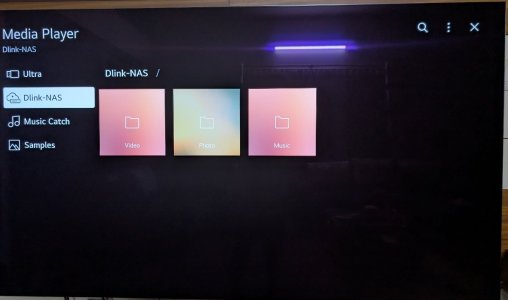
On LG C5, the "Media Player" functions as a DLNA client (no setup required). I use a NAS at home (mostly for Kodi on my Shield). Had enabled the DLNA server on the NAS to check if LG's "Always Ready" function can pickup gallery from the DLNA server (which it doesn't). It does show the DLNA files on the media player alright, see image below. Remember of course DLNA flattens all folders (even if there are 1000s of them) to Photo, Video and Music folders - not very useful if you have many years of pics/vids like me.
 

Attachments

  • c5-mp.jpg
    c5-mp.jpg
    68.3 KB · Views: 3
Thats the problem. My Mediaplayer App does not show any option neither can I find smartshare in the smarthome settings. All I see is hdmi as an option!
 
Join WhatsApp Channel to get HiFiMART.com Offers & Deals delivered to your smartphone!
Back
Top